

Download WampServer (64-Bit) – web development environment, Apache, PHP, MySQL, database management, PHPMyAdmin, local server
Overview
WampServer (64-Bit) is a comprehensive Windows-based web development environment designed to streamline the creation and testing of web applications. It integrates Apache, PHP, and MySQL into a single, cohesive platform, enabling developers to set up a local server quickly and efficiently. This tool is particularly valuable for developers who need to replicate their production server environment locally, ensuring consistency between development and deployment stages. By minimizing configuration discrepancies, WampServer reduces the risk of runtime errors and simplifies troubleshooting during the development lifecycle.
The application targets developers, web designers, and IT professionals who require a reliable, self-contained environment for building dynamic websites and web-based applications. It is especially useful for those working on projects that rely heavily on PHP and MySQL, such as content management systems, e-commerce platforms, and custom web tools. The inclusion of PHPMyAdmin enhances database management capabilities, offering a user-friendly interface for creating, modifying, and monitoring databases without requiring deep SQL expertise.
Although the developer did not provide additional technical details about the team behind WampServer, the tool has established itself as a trusted solution in the developer community. Its ability to support multiple versions of Apache, PHP, and MySQL allows for flexible project management across different technology stacks. Real-world use cases include local testing of new features, rapid prototyping, and collaborative development workflows where environment consistency is critical.
Key Features & Functionality
- Integrated Web Development Environment: Combines Apache, PHP, and MySQL into a unified platform, eliminating the need for manual configuration and reducing setup time for new projects.
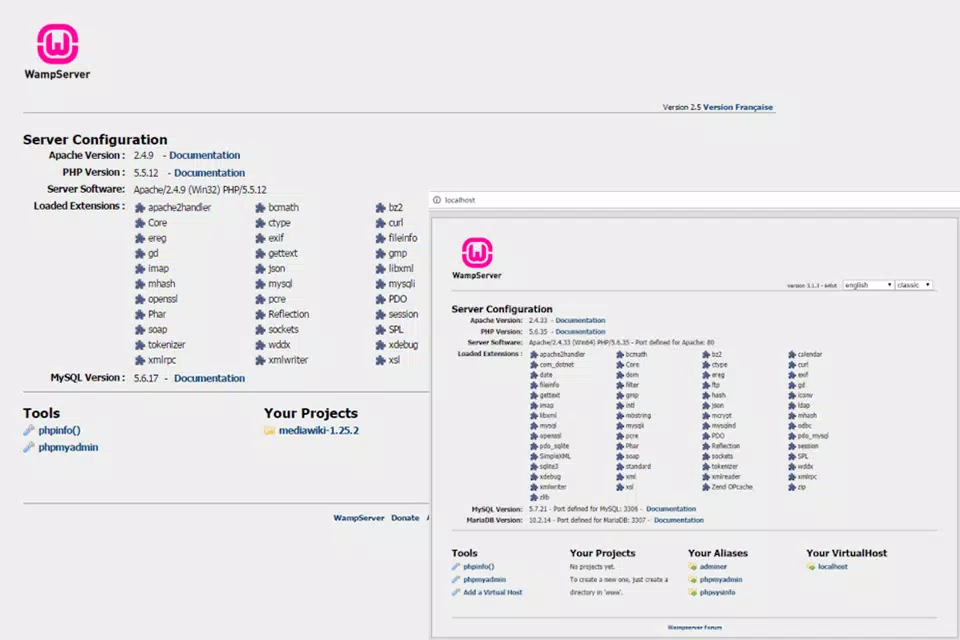
- PHPMyAdmin for Database Management: Provides a web-based interface for managing MySQL databases, enabling users to create tables, run queries, and export data with ease.
- Production Server Replication: Allows developers to mirror their live server environment locally, ensuring that code behaves consistently across different deployment stages.
- Multi-Version Support: Enables the installation and switching between multiple Apache, MySQL, and PHP releases, supporting diverse project requirements and backward compatibility.
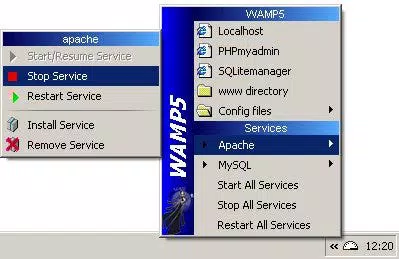
- Tray Icon for Server Control: Offers a compact system tray interface for starting, stopping, and monitoring servers, improving workflow efficiency and accessibility.
For example, a developer working on a legacy application requiring PHP 7.4 can use WampServer to install and run that specific version alongside newer releases for other projects. Similarly, a team can standardize their local environments using WampServer, reducing the “it works on my machine” issue. The tray icon allows quick server restarts during debugging sessions, minimizing downtime and improving development speed.
Interface, UX & Performance
The user interface of WampServer (64-Bit) is minimalistic and focused on functionality, aligning with the needs of technical users rather than casual consumers. The main interface consists of a system tray icon and a small status panel that displays the current state of Apache, MySQL, and PHP services. Navigation is straightforward, with clear visual indicators for server status—green for running, red for stopped—allowing developers to quickly assess their environment.
Although the developer did not list formal performance metrics, the application is designed to operate efficiently in background mode without significantly impacting system resources. It runs smoothly on modern Windows systems and maintains stability during prolonged development sessions. Responsiveness is consistent across different device categories, including laptops and desktops with varying hardware configurations. The interface remains accessible even when multiple services are active.
Stability is a key strength, with minimal reported crashes or unexpected behavior during normal use. The application handles service switching and configuration changes without requiring a full restart in most cases. However, compatibility with older Windows versions was not fully disclosed, and specific system requirements were not listed.
Platform Compatibility & Technical Requirements
WampServer (64-Bit) is exclusively available for Windows operating systems. The current version, 3.3.0, is designed for 64-bit architecture, ensuring compatibility with modern desktop and laptop systems. The application has a file size of 140.3 MB, which is reasonable for a full-featured development environment.
The developer did not specify minimum OS requirements or compatibility details beyond the platform. As such, users should ensure their system meets standard 64-bit Windows requirements for running web servers and databases. No additional hardware specifications were provided, and compatibility with older Windows versions was not confirmed.
Pros and Cons
Pros
- Comprehensive integration of Apache, PHP, and MySQL in a single package.
- Supports multiple versions of core technologies for flexible project management.
- Includes PHPMyAdmin for intuitive database administration.
- Enables accurate replication of production server environments.
- Lightweight and efficient in system resource usage.
Cons
- Platform is limited to Windows only.
- Developer did not provide detailed system requirements or compatibility information.
- Interface is minimal and may feel outdated to new users.
- No built-in version control integration.
- Not available on mobile platforms or for macOS.
FAQ
Is WampServer (64-Bit) free to use?
Yes, WampServer (64-Bit) is available at no cost. It is distributed as free software for Windows users.
Can I install multiple versions of PHP, Apache, and MySQL?
Yes, WampServer allows users to install and switch between multiple releases of Apache, MySQL, and PHP, making it suitable for managing diverse web projects.
Is WampServer secure for local development?
WampServer is designed for local development and should not be exposed to public networks. While it includes standard security practices, users are advised to disable external access when using it in a private environment.
Does WampServer work on macOS or Linux?
No, WampServer (64-Bit) is currently only available for Windows. Users on macOS or Linux should consider alternatives such as XAMPP or Docker-based solutions.
How do I update WampServer to the latest version?
Updates are typically released through the official website. Users can download the latest version from the developer’s site and install it over the existing setup.
Final Thoughts
WampServer (64-Bit) stands out as a reliable and efficient tool for developers seeking a complete local web development environment on Windows. Its ability to integrate Apache, PHP, and MySQL seamlessly, combined with support for multiple versions and PHPMyAdmin for database management, makes it a powerful solution for both beginners and experienced developers. The feature to replicate production servers locally is particularly valuable, ensuring that applications perform consistently across environments.
While the interface is functional and straightforward, it may feel dated to users accustomed to modern design standards. The lack of detailed system requirements and platform limitations to Windows are notable constraints. Nevertheless, for developers working within the Windows ecosystem, WampServer offers a robust, free, and well-established platform for building and testing web applications.
Download WampServer (64-Bit) now to streamline your web development workflow and create high-quality applications with confidence.


